



- 1
Start with a chord.
One chord, one groove, the band behind you. That’s already music.
- 2
Find where it goes.
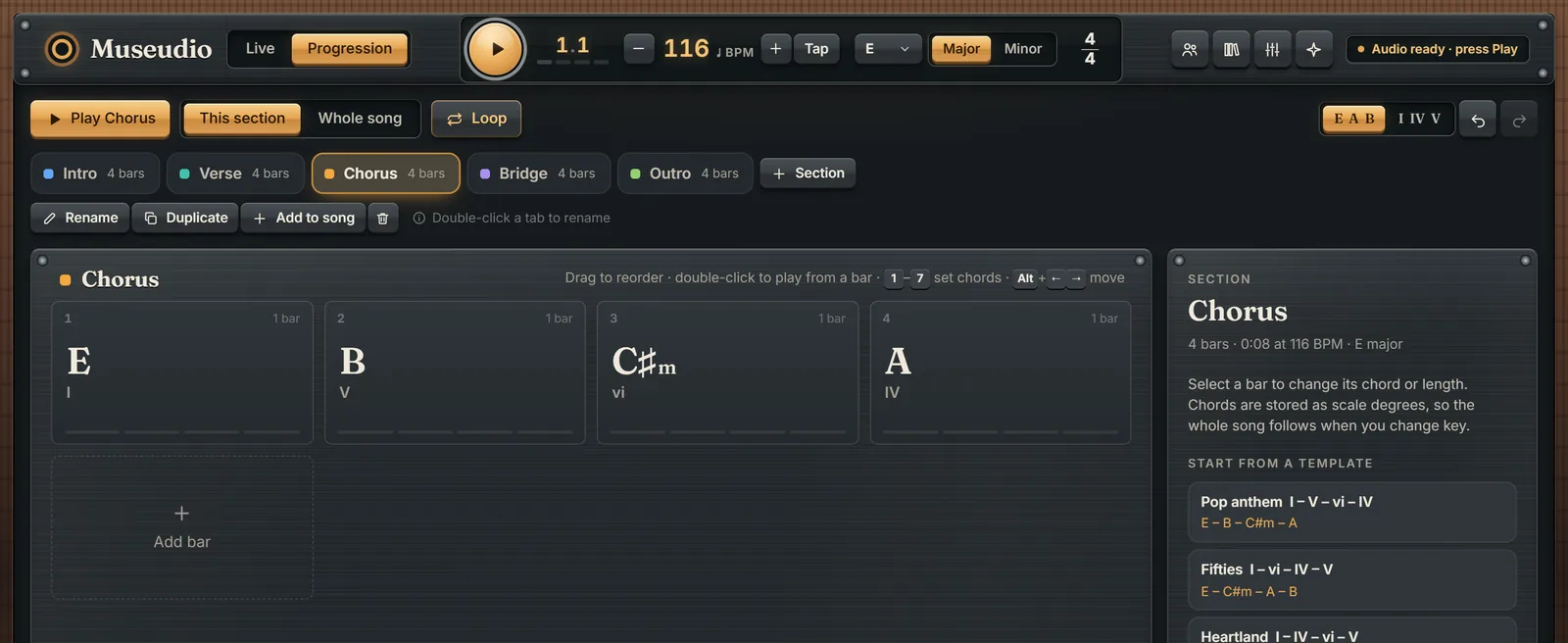
Add bars and set each chord, or start from a template: pop anthem, fifties, heartland, rock vamp, jazz ii–V–I or twelve-bar blues.
- 3
Try it somewhere else.
Change the key and the whole song follows. Same numbers, new letters, new color.
- 4
Give it a shape.
Group bars into an intro, verses, choruses and a bridge, then arrange them into a whole song.
- 5
Hand it to the band.
Loop a section while you work on it, or play the whole song through and hear what you’ve made.
Intro · Practice. Learn. Create.
Your band is ready when you are.
Museudio is a band that plays with you. Drums, bass, keys and guitar follow your chords on the next beat, the theory shows itself as you play, and the ideas you stumble on can become songs of your own. In our desktop preview the band plays real studio instruments, and you can plug in your own guitar.
Museudio is in development. Every screen here is the real app as it looks today, in its new Vintage Rack look.
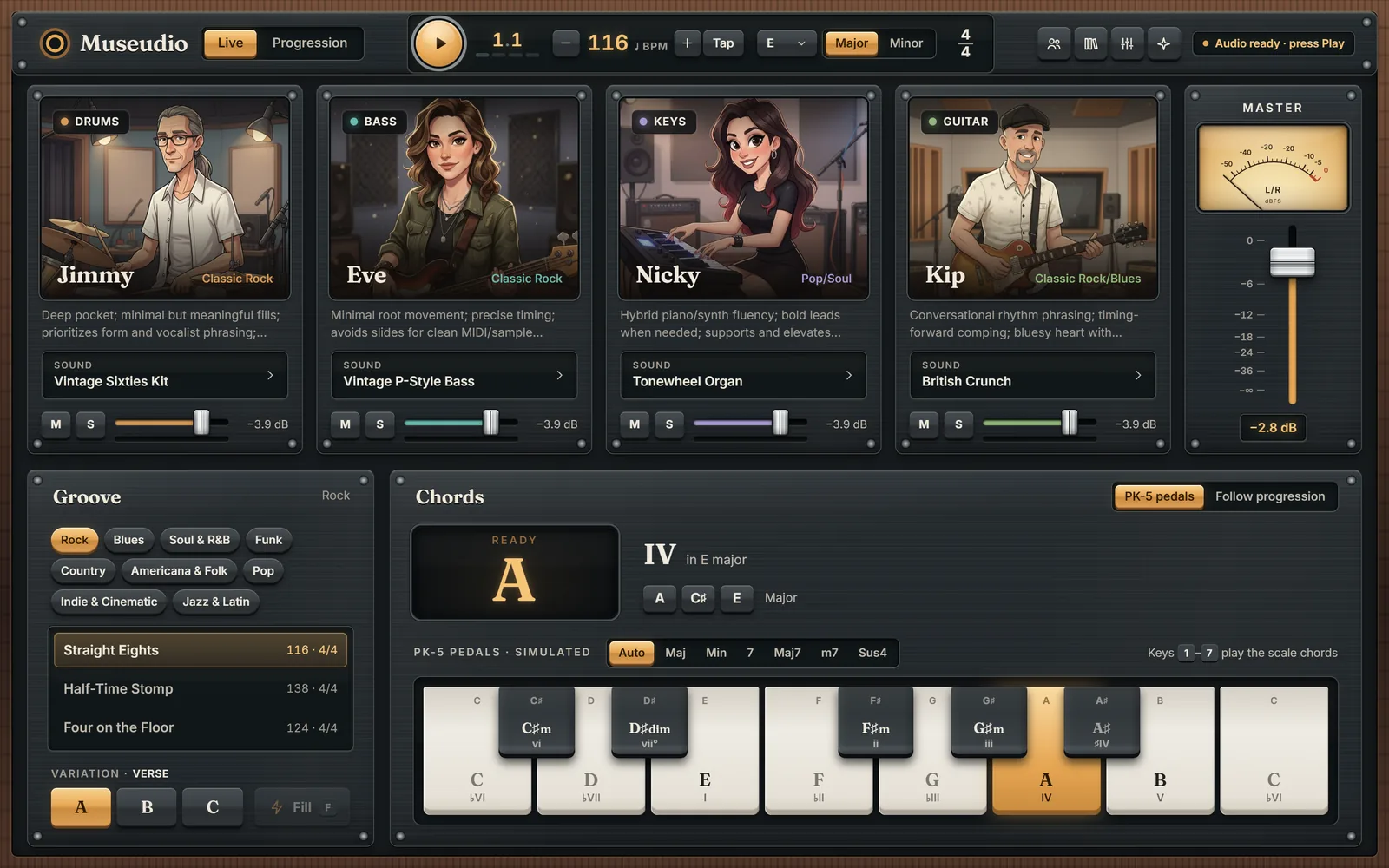
Whatever you bring, the band plays along.
- 3 chords
The curious beginner
Three chords are enough for a song. Play them with a band and you’ll hear why they work together.
- Every day
The developing player
Practice your parts with a band that keeps time and follows your changes, at any tempo, in any key. Plug in and play along.
- One idea
The songwriter
Sketch a progression, give it sections, and hear the whole song played back before the idea fades.
- Years in
The seasoned musician
Try a new feel, rehearse in another key, test an arrangement, or just jam when nobody else is free.
Verse · 01 Practice
Practice that sounds like playing.
Pick a groove or a song, set the key and tempo, and start. Change chords from your keyboard or the on-screen pedalboard, and the drums, bass, keys and guitar follow you on the next beat, each playing their own part.
In the app today
- A four-piece band that follows your chord changes as you play
- Nine styles of groove, from rock and blues to soul, funk, Americana and jazz, with A, B and C variations and fills
- Any key, major or minor, any tempo (tap it in), several time signatures
- Mute or solo any musician to work on a part, with a full mixer
- Two looks to play in: the warm Studio Night and the new Vintage Rack
In development Hardware foot pedals and MIDI keyboards. For now you play chords from your computer keyboard or the on-screen pedals.
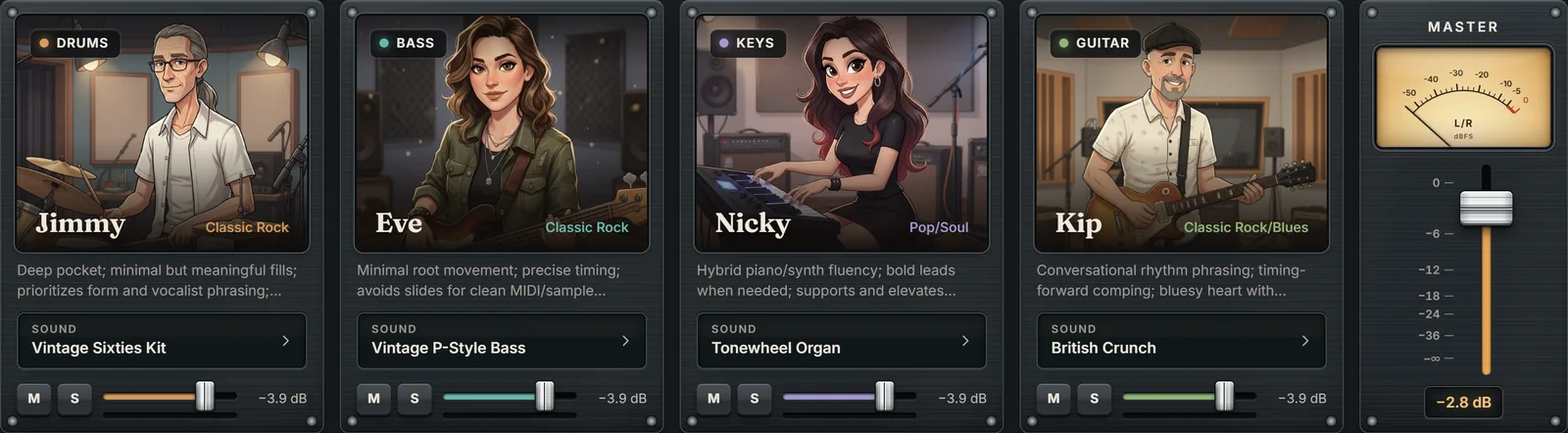
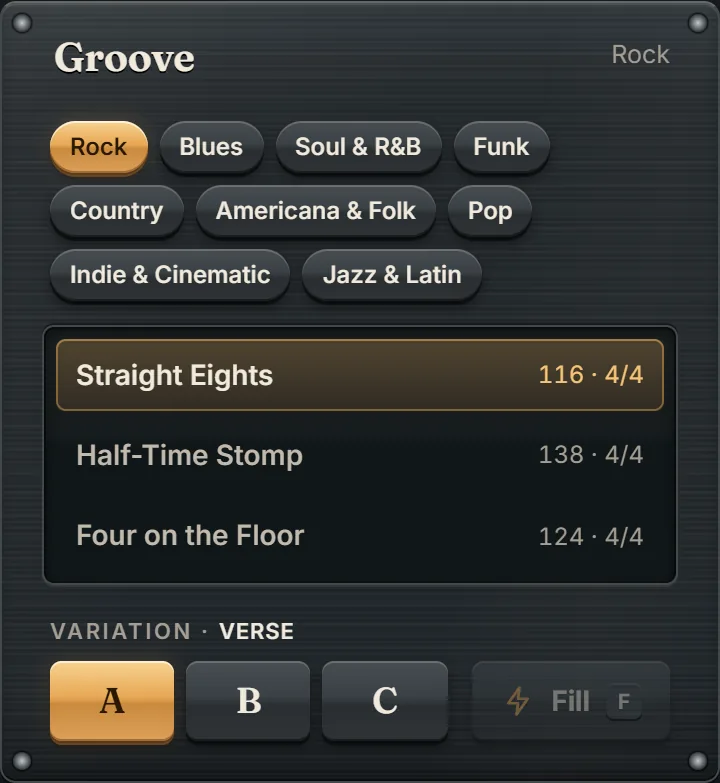
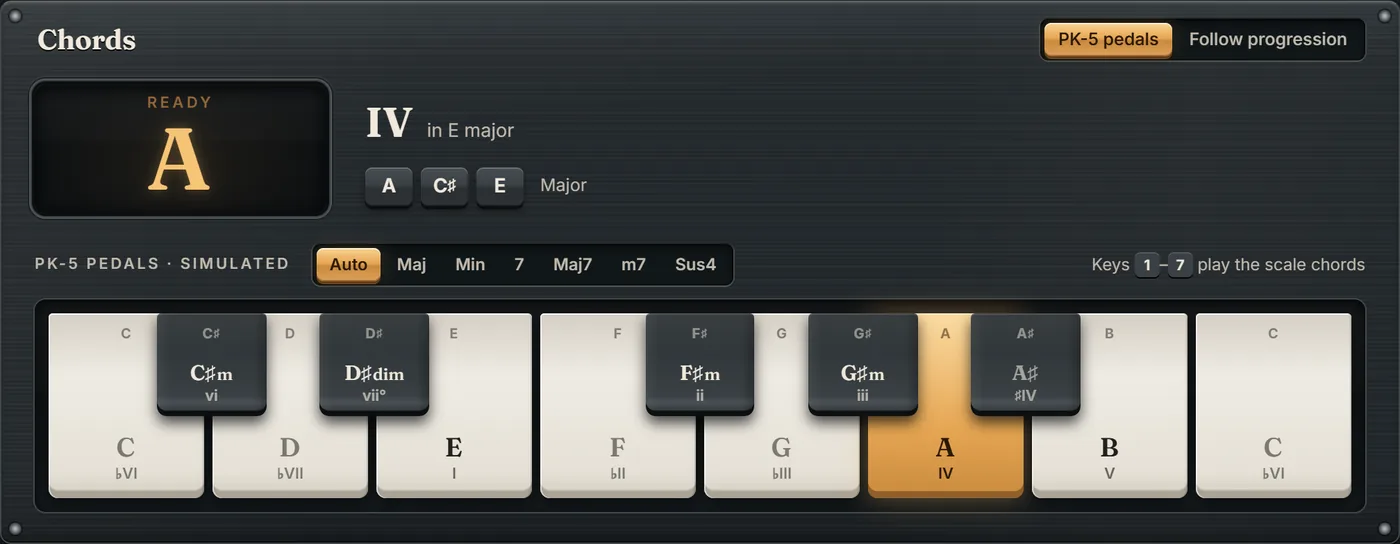
In our desktop preview
Plug in and play through Museudio.
The same band, on real instruments, with your own guitar in the mix.
- Real studio instrumentsSampled drum kits, basses and keys, and Museudio’s own guitar voices.
- Your guitar, no lagThrough an audio interface, with about 6 milliseconds of latency.
- Amps and stomp boxesClean, crunch and high-gain amps, overdrives and distortions, and a noise gate.
- A rack tunerChromatic, with a needle or a strobe, accurate to a fraction of a cent.
- Whole songsThe band performs complete songs, in any key and at any tempo.
- Your sounds, rememberedEach musician keeps the sound you choose for them.
In our desktop preview
Hear the band.
Six songs, played by Museudio’s band on its new instruments and mixed by Museudio. Nobody recorded these: every note is the band’s own.
Ready
Greasy Sixteenths
0:00 / 0:44
DRSKit drums, a sampled bass, Kip on Museudio’s single-coil guitar through its clean amp, and Museudio’s keys. Songs and parts are Museudio’s own. 45-second excerpts.
Chorus · 02 Learn
Theory you can hear.
Every chord in Museudio shows its name, its notes and its number in the key. The I–V–vi–IV behind a hundred songs stops being a formula and becomes something you can play, hear and change.
Tap a chord
E
I in E major
Now change the key. The numbers stay; the letters move. That’s transposing, and it’s why Museudio stores your songs as numbers: the whole song follows when you change key.
In the app today
- The chord you’re playing, its notes and its Roman numeral, as you play
- Every pedal labeled with the chord it plays in your key
- Major, minor, 7, maj7, m7 and sus4 chord qualities
- Progressions written as numbers, so they work in any key
In development
- Guided learning woven into playing, not separate from it
- Plain-language explanations of what you’re hearing: scales, intervals, and why a chord pulls toward home
- Practice paths that grow with you, from first chords to your own arrangements
Bridge · 03 Create
Your practice session could become your next song.
In development Deeper composition tools, from melodic ideas to fuller arrangements.
Verse 2 · 04 The band
Thirty-two musicians. Every one has a story.
Jimmy has a deep pocket and never rushes the chorus. Maya locks in with the drummer straight away. Levi plays texture first. Thirteen already play with a hand-tuned feel of their own; the rest are still finding theirs. Practicing with people, even imaginary ones, beats practicing with a click. And the band is growing: a percussionist with hand drums from around the world is next.
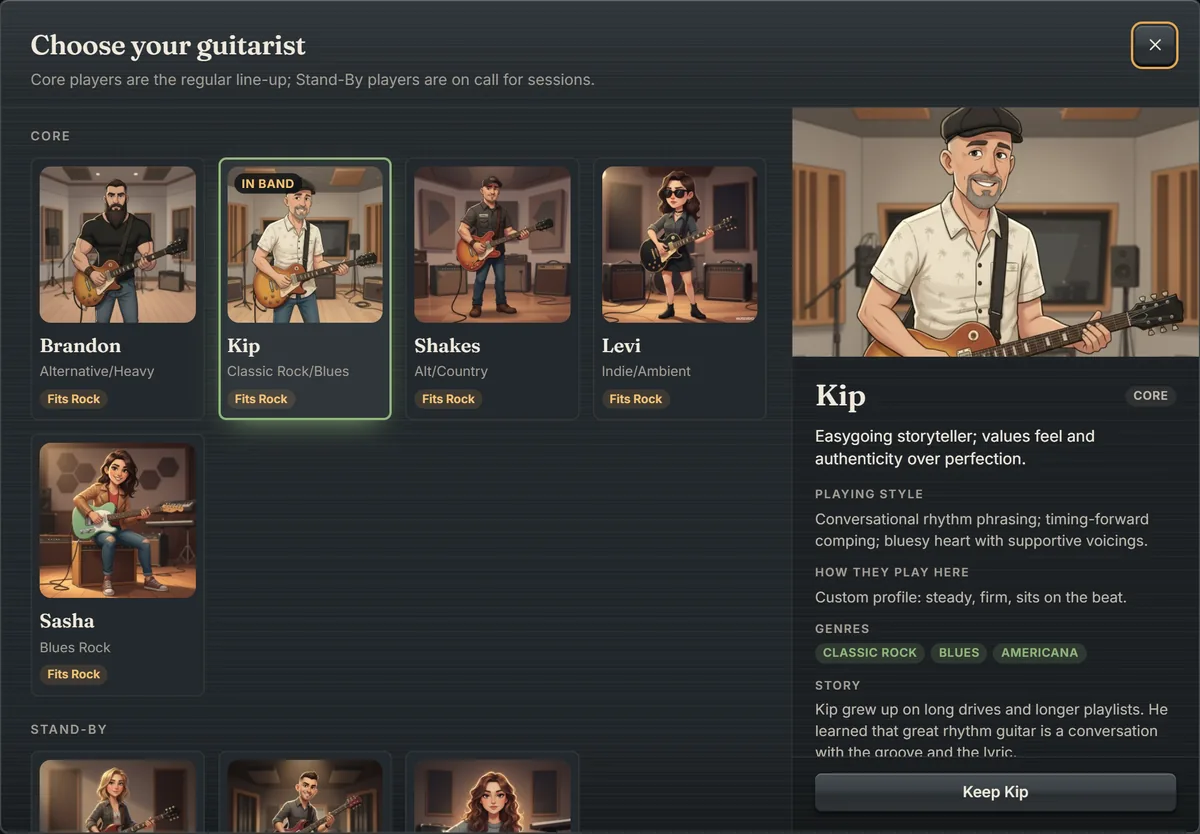
Build your line-up, or call in a studio band.
Every instrument has five core players and three on stand-by, each with a story, a playing style and the genres they love. Swap one in and the band changes character. Or load one of five ready-made bands, from The House Band and Soul Kitchen to Indie Night, After Hours Blues and Front Porch, and save your own.
Outro · 05 What’s next
Where Museudio is headed.
Museudio is still being built, and it has grown a lot since this page first went up: real instruments, your own guitar rig, whole songs and a new look. Here’s exactly what works today, what runs in our desktop preview, and what we’re working on, so you know what you’re signing up for.
Playing today
- Live Mode: a band that follows your chords
- Progression Mode: bars, sections and a whole-song arrangement
- 32 musicians and five ready-made studio bands
- Grooves in nine styles, with variations and fills
- Key, major or minor, tempo and time signature
- Chord names, notes and Roman numerals as you play
- A mixer with volume, pan, mute and solo
- Two looks: Studio Night and Vintage Rack
In our desktop preview
- The band on real studio instruments: sampled drums, basses and keys, and Museudio’s own guitar voices
- Your own guitar through Museudio, with about 6 ms of latency
- Amp models, stomp-box pedals, a noise gate and a rack tuner
- Whole songs performed by the band, in any key and tempo
- Saving the sound you choose for each musician
In development
- Guided learning and theory explained as you play
- A percussionist with hand drums from around the world, and line-ups of any size, from a duo to a full band
- A set of ready-to-play guitar sounds
- Every groove style as developed as rock and blues are today
- MIDI foot pedals and keyboards
- Deeper composition and arrangement tools
Be there for the first note.
Join the list for early access news, and tell us what you’d love to play, learn or create. We read every reply.
We’ll only use your email to tell you about Museudio.
Questions
Can I use Museudio now?
Not yet. Museudio is in active development and isn’t available to download. Join the list and you’ll hear first when that changes.
Do I need to know music theory?
No. Museudio is built so you learn it by playing: chords show their names and numbers as you use them, and you hear what each change does. If you already know theory, you’ll get to it faster.
Is it only for beginners?
No. Beginners get a band that makes three chords sound like a song. Experienced players get a practice band in any key and tempo, a quick way to sketch and arrange progressions, and musicians with distinct feels to try ideas against.
Can I plug in my guitar?
In our desktop preview, yes. Plug into an audio interface and play through amp models, stomp boxes, a noise gate and a tuner, with about 6 milliseconds of latency, while the band plays along. It isn’t part of the browser version.
Is it a DAW?
No. There’s no timeline of tracks to manage. You choose chords, grooves and musicians, and the band plays. It’s for practicing, exploring and writing, not for mixing a record.
What will it run on?
Museudio is being built as a desktop app first. We’ll share platforms and timing with the list before anywhere else.